- 自由研究に戻る
- Menu表示

2012.03.25 等々力公園 梅の花咲く
Table Layout / Linear Layout
Tableレイアウト(2列のテーブル)です。
・列の大きさ(サイズ)は、最大列のサイズに調整されるようです。
・列のサイズを変更する場合は、別のTableLayoutを設定すると可能です。
・以下‐‐「 借金のtable(2列のテーブル)では」‐‐
・gravity right などを使って2列目の文字列を右寄せは‐‐出来ませんでした。
・2列目は、左寄せされるようです
・2列目の書き出しは、1列目の最大サイズで決まるようです。
・2列目は自動改行はされないが、改行コードを挿入することは可能です

Fig.1 Table layoutテスト画面
//////////////////////////////////////////////////////////
/////////// xmlファイル///////////////////////////////////
<?xml version="1.0" encoding="utf-8"?>
<LinearLayout xmlns:android="http://schemas.android.com/apk/res/android"
android:layout_width="wrap_content"
android:layout_height="fill_parent"
android:orientation="vertical" >
<TextView
android:layout_width="fill_parent"
android:layout_height="wrap_content"
android:text="TableLayout確認" />
<TableLayout
android:id="@+id/tableLayout1"
android:layout_width="match_parent"
android:layout_height="wrap_content" >
<TableRow
android:id="@+id/tableRow1"
android:layout_width="fill_parent"
android:layout_height="wrap_content" >
<TextView
android:text="名前"
android:layout_width="wrap_content"
android:layout_height="wrap_content" />
<EditText
android:layout_marginLeft="20px"
android:id="@+id/personNameText"
android:hint="必須"
android:layout_width="wrap_content"
android:layout_height="wrap_content" />
</TableRow>
</TableLayout>
<TableLayout
android:id="@+id/tableLayout2"
android:layout_width="match_parent"
android:layout_height="wrap_content" >
<TableRow
android:id="@+id/tableRow2"
android:layout_width="wrap_content"
android:layout_height="wrap_content" >
<TextView
android:text="県の借金"
android:layout_width="wrap_content"
android:layout_height="wrap_content" />
<TextView
android:text="3兆4000億円"
android:layout_width="wrap_content"
android:layout_height="wrap_content" />
</TableRow>
<TableRow
android:id="@+id/tableRow3"
android:layout_width="wrap_content"
android:layout_height="wrap_content" >
<TextView
android:text="一人当たり"
android:layout_width="wrap_content"
android:layout_height="wrap_content" />
<TextView
android:text="約37万円"
android:layout_width="wrap_content"
android:layout_height="wrap_content" />
</TableRow>
<TableRow
android:id="@+id/tableRow4"
android:layout_width="wrap_content"
android:layout_height="wrap_content" >
<TextView
android:text="神奈川県の借金(平成23年度)"
android:layout_width="wrap_content"
android:layout_height="wrap_content" />
<TextView
android:text="3兆4000億円(県民一人約37万円)"
android:layout_width="wrap_content"
android:layout_height="wrap_content" />
</TableRow>
</TableLayout>
</LinearLayout>
Linear Layout
Linearレイアウト(2列のレイアウトを考えます)
・以下‐‐「 県の借金(1列目)、3兆4000億円(2列目)を考えます」‐‐
・2列目をgravity centerで位置指定‐‐右寄せにならない
・2列目をgravity rightで位置指定‐‐右寄で表示される
r
・2列目をGravityの指定をしないと、1列目に続けて、左寄せで表示される
・2列目は自動改行されて表示される
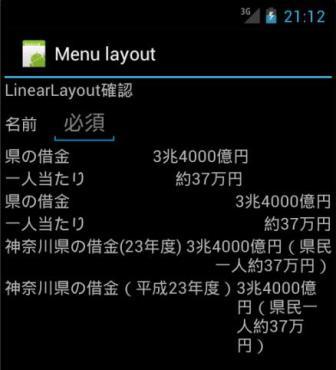
Fig.2 Linearlayoutテスト画面
//////////////////////////////////////////////////////////
/////////// xmlファイル///////////////////////////////////
<?xml version="1.0" encoding="utf-8"?>
<LinearLayout xmlns:android="http://schemas.android.com/apk/res/android"
android:layout_width="match_parent"
android:layout_height="match_parent"
android:orientation="vertical" >
<TextView
android:layout_width="fill_parent"
android:layout_height="wrap_content"
android:text="LinearLayout確認" />
<LinearLayout
android:orientation="horizontal"
android:id="@+id/linearLayout1"
android:layout_width="match_parent"
android:layout_height="wrap_content" >
<TextView
android:text="名前"
android:layout_width="wrap_content"
android:layout_height="wrap_content" />
<EditText
android:layout_marginLeft="20px"
android:id="@+id/personNameText"
android:hint="必須"
android:layout_width="wrap_content"
android:layout_height="wrap_content" />
</LinearLayout>
<LinearLayout
android:orientation="horizontal"
android:id="@+id/linearLayout1"
android:layout_width="match_parent"
android:layout_height="wrap_content" >
<TextView
android:layout_width="wrap_content"
android:layout_height="wrap_content"
android:text="県の借金"/>
<TextView
android:layout_width="fill_parent"
android:layout_height="wrap_content"
android:text="3兆4000億円"
android:gravity="center"/>
</LinearLayout>
<LinearLayout
android:orientation="horizontal"
android:id="@+id/linearLayout1"
android:layout_width="match_parent"
android:layout_height="wrap_content" >
<TextView
android:layout_width="wrap_content"
android:layout_height="wrap_content"
android:text="一人当たり" />
<TextView
android:layout_width="fill_parent"
android:layout_height="wrap_content"
android:text="約37万円"
android:gravity="center"/>
</LinearLayout>
<LinearLayout
android:orientation="horizontal"
android:id="@+id/linearLayout1"
android:layout_width="match_parent"
android:layout_height="wrap_content" >
<TextView
android:layout_width="wrap_content"
android:layout_height="wrap_content"
android:text="県の借金"/>
<TextView
android:layout_width="fill_parent"
android:layout_height="wrap_content"
android:text="3兆4000億円"
android:gravity="right"/>
</LinearLayout>
<LinearLayout
android:orientation="horizontal"
android:id="@+id/linearLayout1"
android:layout_width="match_parent"
android:layout_height="wrap_content" >
<TextView
android:layout_width="wrap_content"
android:layout_height="wrap_content"
android:text="一人当たり" />
<TextView
android:layout_width="fill_parent"
android:layout_height="wrap_content"
android:text="約37万円"
android:gravity="right"/>
</LinearLayout>
<LinearLayout
android:orientation="horizontal"
android:id="@+id/linearLayout1"
android:layout_width="match_parent"
android:layout_height="wrap_content" >
<TextView
android:layout_width="wrap_content"
android:layout_height="wrap_content"
android:text="神奈川県の借金(23年度)"/>
<TextView
android:layout_width="fill_parent"
android:layout_height="wrap_content"
android:text="3兆4000億円(県民一人約37万円)"
android:gravity="right"/>
</LinearLayout>
<LinearLayout
android:orientation="horizontal"
android:id="@+id/linearLayout1"
android:layout_width="match_parent"
android:layout_height="wrap_content" >
<TextView
android:layout_width="wrap_content"
android:layout_height="wrap_content"
android:text="神奈川県の借金(平成23年度)" />
<TextView
android:layout_width="fill_parent"
android:layout_height="wrap_content"
android:text="3兆4000億円(県民一人約37万円)" />
</LinearLayout>
</LinearLayout>
参考サイト
(1)画面の作り方 TechFirm
(2)gravityとlayout_gravityの違い
(3)レイアウトの入れ子設定
等々沢山ありますがありがとうございました。