- 自由研究に戻る
- Menu表示

2012.04.08 多摩川-中原区から
android テキスト音声読み上げ
音声に関するトレーニングです。
・テキストの音声読み上げ
・音声認識
の確認をしてみます。
テキスト音声読み上げエンジン、N2 TTSをgoogleストアからダウンロードします。携帯でダウンロードし、SDカードにback up(AppMonsterを使いました)した後にandroid AVDにインストール(DDMSでdata/appにコピー)しました。
サンプル再生すると、日本語サンプルが聞けます。パソコンの性能が悪いためか、音声が途切れてしまいます。(残念)
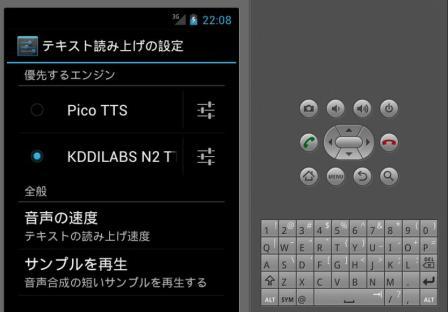
Fig.1 N2 ttsの設定画面
次に下記サイトに紹介されているサンプルソフトでN2 ttsを動かしてみます。ソースコードを借用させてもらいます。
参考サイト:テキストの読み上げ(TextToSpeech)を利用する
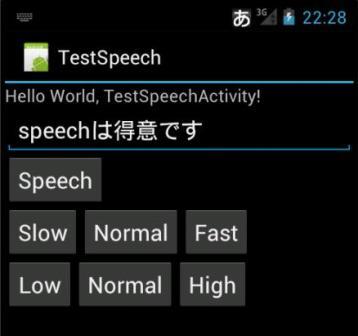
Fig.2 N2 ttsで日本語読み上げ画面
なんと「speechは得意です」ちゃんと英語と日本語をつなげて読み上げていました。(びっくり)
音声認識
google 音声検索をAVD(エミュレータ)で使えるのかと思っていたのですが、難しいようです。実機で確認でしょうか?(次期課題)
webサイトからテキスト読み込み
天気予報をwebサイトから読み込んで、音声出力してみます。
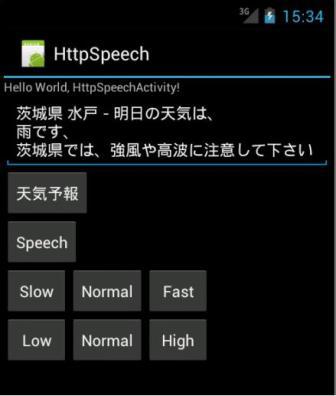
Fig.3 天気予報読み上げ画面
天気予報をダウンロードする方法は、こちら別枠で確認したものを使いました。
天気予報をダウンロードしただけだと、読み上げに適さない文言のように思えましたので、少々手を加えてます。
・天気予報ボタンでwebから天気予報をダウンロードし、テキスト読み上げます。
・speechボタンは、テキストを読み上げます。
//////////////////////////////////////////////////////////
/////////// java srcファイル///////////////////////////////////
package httpSpeech.app;
import android.app.Activity;
import android.os.Bundle;
import java.util.Locale;
import android.speech.tts.TextToSpeech;
import android.util.Log;
import android.view.View;
import android.widget.Button;
import android.widget.EditText;
import java.io.InputStream;
import java.io.StringReader;
import java.net.HttpURLConnection;
import java.net.URL;
import java.util.StringTokenizer;
import org.xmlpull.v1.XmlPullParser;
import android.app.Activity;
import android.os.Bundle;
import android.os.Handler;
import android.util.Xml;
import android.view.View;
import android.view.View.OnClickListener;
import android.widget.TextView;
public class HttpSpeechActivity extends Activity implements View.OnClickListener, TextToSpeech.OnInitListener {
final private Float SPEECH_SLOW = 0.5f;
final private Float SPEECH_NORMAL = 1.0f;
final private Float SPEECH_FAST = 1.5f;
final private Float PITCH_LOW = 0.5f;
final private Float PITCH_NORMAL = 1.0f;
final private Float PITCH_HIGH = 1.5f;
private TextToSpeech tts;
private Button buttonSpeech;
private Button buttonSpeech2;
private Button buttonSlow;
private Button buttonNormal;
private Button buttonFast;
private Button buttonLowPitch;
private Button buttonNormalPitch;
private Button buttonHighPitch;
Handler mHandler = new Handler(); //Handlerのインスタンス生成
TextView mTextView;
String src = new String();
byte[] line = new byte[1024];
int size;
/** Called when the activity is first created. */
@Override
public void onCreate(Bundle savedInstanceState) {
super.onCreate(savedInstanceState);
setContentView(R.layout.main);
//TextView取得
mTextView = (TextView)findViewById(R.id.EditTextSpeech);
// ボタンのClickListenerの登録
buttonSpeech = (Button)findViewById(R.id.ButtonSpeech);
buttonSpeech.setOnClickListener(this);
buttonSpeech2 = (Button)findViewById(R.id.ButtonSpeech2);
buttonSpeech2.setOnClickListener(this);
buttonSlow = (Button)findViewById(R.id.ButtonSlow);
buttonSlow.setOnClickListener(this);
buttonNormal = (Button)findViewById(R.id.ButtonNormal);
buttonNormal.setOnClickListener(this);
buttonFast = (Button)findViewById(R.id.ButtonFast);
buttonFast.setOnClickListener(this);
buttonLowPitch = (Button)findViewById(R.id.ButtonLowPitch);
buttonLowPitch.setOnClickListener(this);
buttonNormalPitch = (Button)findViewById(R.id.ButtonNormalPitch);
buttonNormalPitch.setOnClickListener(this);
buttonHighPitch = (Button)findViewById(R.id.ButtonHighPitch);
buttonHighPitch.setOnClickListener(this);
// TextToSpeechオブジェクトの生成 初期化
tts = new TextToSpeech(this, this);
}
@Override protected void onDestroy() {
super.onDestroy();
if (null != tts) {
// TextToSpeechのリソースを解放する
tts.shutdown();
}
}
// @Override
public void onInit(int status) {
if (TextToSpeech.SUCCESS == status) {
Locale locale = Locale.ENGLISH;
if (tts.isLanguageAvailable(locale) >= TextToSpeech.LANG_AVAILABLE) {
tts.setLanguage(locale);
} else {
Log.d("", "Error SetLocale");
}
} else {
Log.d("", "Error Init");
}
}
private void speechText(String string) {
//String string = ((EditText)findViewById(R.id.EditTextSpeech)).getText().toString();
if (0 < string.length()) {
if (tts.isSpeaking()) {
// 読み上げ中なら止める
tts.stop();
} // 読み上げ開始
tts.speak(string, TextToSpeech.QUEUE_FLUSH, null);
}
}
// @Override
public void onClick(View v) {
if (buttonSpeech == v) {
mTextView.setText("");
httpWeather();
}else if (buttonSpeech2 == v) {
String string = ((EditText)findViewById(R.id.EditTextSpeech)).getText().toString();
speechText(string);
} else if (buttonSlow == v) {
// 再生速度の設定
tts.setSpeechRate(SPEECH_SLOW);
} else if (buttonNormal == v) {
// 再生速度の設定
tts.setSpeechRate(SPEECH_NORMAL);
} else if (buttonFast == v) {
// 再生速度の設定
tts.setSpeechRate(SPEECH_FAST);
} else if (buttonLowPitch == v) {
// 再生ピッチの設定
tts.setPitch(PITCH_LOW);
} else if (buttonNormalPitch == v) {
// 再生ピッチの設定
tts.setPitch(PITCH_NORMAL);
} else if (buttonHighPitch == v) {
// 再生ピッチの設定
tts.setPitch(PITCH_HIGH);
}
}
private void httpWeather() {
// スレッド起動
(new Thread(new Runnable() {
// @Override
public void run() {
// 通常バックグランドをここに記述します
int intEventType = -1;
String strParserName = "";
StringTokenizer objToken = null;
String strGettingTitle = "";
String strGettingTelop = "";
String strGettingDiscription = "";
HttpURLConnection http = null;
InputStream in = null;
mTextView = (TextView)findViewById(R.id.EditTextSpeech);
try{
//取得XMLのURIを設定
//uri += "?city=" + id + "&day=tomorrow";
URL uri = new URL("http://weather.livedoor.com/forecast/webservice/rest/v1?city=54&day=tomorrow");
//XML取得
http = (HttpURLConnection)uri.openConnection();
http.setRequestMethod("GET");
http.connect();
// データを取得
in = http.getInputStream();
//XMLから情報を抽出
XmlPullParser parser = Xml.newPullParser();
parser.setInput(in,"UTF-8");
while(intEventType != XmlPullParser.END_DOCUMENT){
switch (intEventType){
case XmlPullParser.START_TAG:
strParserName = parser.getName() ;
if(strParserName.equals("title") && strGettingTitle.equals("")){
strGettingTitle = parser.nextText()+"は、";
}
if(strParserName.equals("telop") && strGettingTelop.equals("")){
strGettingTelop = parser.nextText()+"です、";
}
if(strParserName.equals("description") && strGettingDiscription.equals("")){
strGettingDiscription = parser.nextText();
String[] strAry=strGettingDiscription.split("。",2);
strGettingDiscription=strAry[0]; //descriptionは1文のみ表示
}
}
if(!strParserName.equals("") && !strGettingTelop.equals("") && !strGettingDiscription.equals("")){
break;
}
intEventType = parser.next();
}
//取得データを画面に表示
src=strGettingTitle + "\n" + strGettingTelop + "\n" + strGettingDiscription;
}catch(Exception e){
src=e.toString();
}finally{
}
mHandler.post(new Runnable() {
// @Override
public void run() {
//取得したイメージをImageViewに設定
mTextView.setText(src);
}
});
speechText(src);
}
})).start();
}
}
//////////////////////////////////////////////////////////
/////////// xmlファイル///////////////////////////////////
<?xml version="1.0" encoding="utf-8"?>
<LinearLayout xmlns:android="http://schemas.android.com/apk/res/android"
android:layout_width="fill_parent"
android:layout_height="fill_parent"
android:orientation="vertical" >
<TextView
android:layout_width="fill_parent"
android:layout_height="wrap_content"
android:text="@string/hello" />
<EditText
android:id="@+id/EditTextSpeech"
android:layout_width="match_parent"
android:layout_height="wrap_content" >
<requestFocus />
</EditText>
<Button
android:id="@+id/ButtonSpeech"
android:layout_width="wrap_content"
android:layout_height="wrap_content"
android:text="天気予報" />
<Button
android:id="@+id/ButtonSpeech2"
android:layout_width="wrap_content"
android:layout_height="wrap_content"
android:text="Speech" />
<LinearLayout
android:id="@+id/linearLayout1"
android:layout_width="match_parent"
android:layout_height="wrap_content" >
<Button
android:id="@+id/ButtonSlow"
android:layout_width="wrap_content"
android:layout_height="wrap_content"
android:text="Slow" />
<Button
android:id="@+id/ButtonNormal"
android:layout_width="wrap_content"
android:layout_height="wrap_content"
android:text="Normal" />
<Button
android:id="@+id/ButtonFast"
android:layout_width="wrap_content"
android:layout_height="wrap_content"
android:text="Fast" />
</LinearLayout>
<LinearLayout
android:id="@+id/linearLayout2"
android:layout_width="match_parent"
android:layout_height="wrap_content" >
<Button
android:id="@+id/ButtonLowPitch"
android:layout_width="wrap_content"
android:layout_height="wrap_content"
android:text="Low" />
<Button
android:id="@+id/ButtonNormalPitch"
android:layout_width="wrap_content"
android:layout_height="wrap_content"
android:text="Normal" />
<Button
android:id="@+id/ButtonHighPitch"
android:layout_width="wrap_content"
android:layout_height="wrap_content"
android:text="High" />
</LinearLayout>
</LinearLayout>
参考サイト
沢山ありますがありがとうございました。